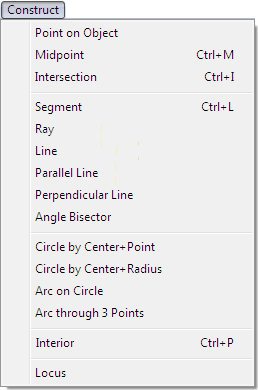
Construct Menu |
  
|
| Show/Hide Hidden Text |
Construct Menu |
|
| Show/Hide Hidden Text |
The Construct menu provides commands for accomplishing many important geometric constructions. Most of these constructions could also be done with Sketchpad’s Compass and Straightedge tools, but the Construct menu often provides simpler and quicker ways of completing a construction.
|
Click the name of any command in the menu to see detailed information about that command.
|
To use any Construct menu command, you must select the appropriate objects (the prerequisites) in the sketch.
If a command you want to use is unavailable, you might have too few or too many objects selected. Check the list of prerequisites below, and check the status line to make sure you don't have extra unnoticed objects selected. Then select additional required objects or deselect unwanted objects. Alternatively, deselect all objects and then carefully select the appropriate prerequisites.
Command: |
Prerequisites: |
•One or more path objects |
|
•One or more segments |
|
•Two segments, rays, lines, circles, or arcs •One locus or function plot and one segment, ray, line, circle, or arc •Two function plots •One polygon and one ray (command becomes First Intersection) |
|
•Two or more points |
|
•One point and one segment, ray, or line •Multiple points and one segment, ray, or line •One point and multiple segments, rays, or lines |
|
•One point and one segment, ray, or line •Multiple points and one segment, ray, or line •One point and multiple segments, rays, or lines |
|
•Three points, with the vertex point selected second •Two rays or segments with a common endpoint |
|
•Two points |
|
•One point and one segment or distance value •Multiple points and one segment or distance value •One point and multiple segments and/or distance values |
|
•One circle and two points on the circle •One center point and two other points equally distant from the center point |
|
•Three noncollinear (noncollinear points do not lie in a straight line) points |
|
•Three or more points |
|
•One or more circles |
|
•One or more arcs |
|
•One or more arcs |
|
•One point on a path and one object that depends on the point on path •One parameter and one object that depends on the parameter •One independent point, one path that does not depend on the point, and one object that depends on the independent point |